Your voice. Posted. Every week.
The Content Engine turns your voice memos into posts that sound like you wrote them. It also builds a bank of your ideas and drafts a couple of extra posts from it every week, so your feed stays active even when you don't record.
Here's how it works:
- You talk. Record a voice memo on your phone whenever an idea hits (in the car, between meetings, wherever).
- We turn it into a post. The Content Engine drafts a post from your memo, written in your voice. Your voice profile is built from your own writing and the answers you give on the next few pages.
- Your idea bank keeps working. Every story and idea you give us goes into your idea bank, and once a week the engine drafts a couple of extra posts from it. Ideas you mention in your memos get added over time.
- You approve everything. All drafts land in your review queue. Nothing posts without you.
Setup takes about 20 minutes, and this page walks you through every step. We recommend doing this from a computer, not your phone — you'll be pasting in things you've written and setting up a couple of accounts, which is clumsy on a small screen. (Your phone gets used for exactly one step — installing the recorder app — and we'll email you what you need for it.) After this, you'll have a thriving LinkedIn or Facebook page!
Your answers save automatically in this browser, so you can step away and pick up where you left off. (Heads up: private/incognito windows don't keep saved answers.)
About you and your business
The engine writes in your voice about your world. These questions tell us what that world is.
Your writing
The closer we can study your actual writing, the closer the drafts will sound to you. Paste in real things you've written. Don't clean them up first (the rough edges are the voice). The more you give us here, the better every future post sounds. This is the single biggest factor.
Story bank
Your first few posts will come from stories you already have. Give us the raw material. A sentence or two per story is plenty. You'll tell the full version in a voice memo later. Aim for at least 3.
That's everything we need
Your answers and stories are what we build your voice profile from. If any answer feels thin, now's the moment to go back and add to it (the Back button keeps everything you've typed).
When you hit Continue, your answers come to us and your voice profile starts taking shape. Two quick setup steps left after this: your recorder and your Buffer.
Set up your recorder
One free app connects your voice to the engine.
Step A: Install the app
- Install Webhook Audio Recorder: on iPhone from the App Store, on Android from Google Play. The free version is all you need.
Step B: Paste your personal link
- Grab your link from the email we just sent to (subject: "Your Content Engine recorder link"). Open that email on your phone and press-and-hold the link to copy it. Don't tap it to open it — it's not a web page, just an address for the app.
- Open the app and tap Webhook Configuration.
- Tap the + button to add a new webhook.
- Name it anything you like (say, Tenney Technologies), and paste your link as the URL. It's yours alone.
Doing all of this on your phone right now? Here's the same link — copy it straight from here instead:
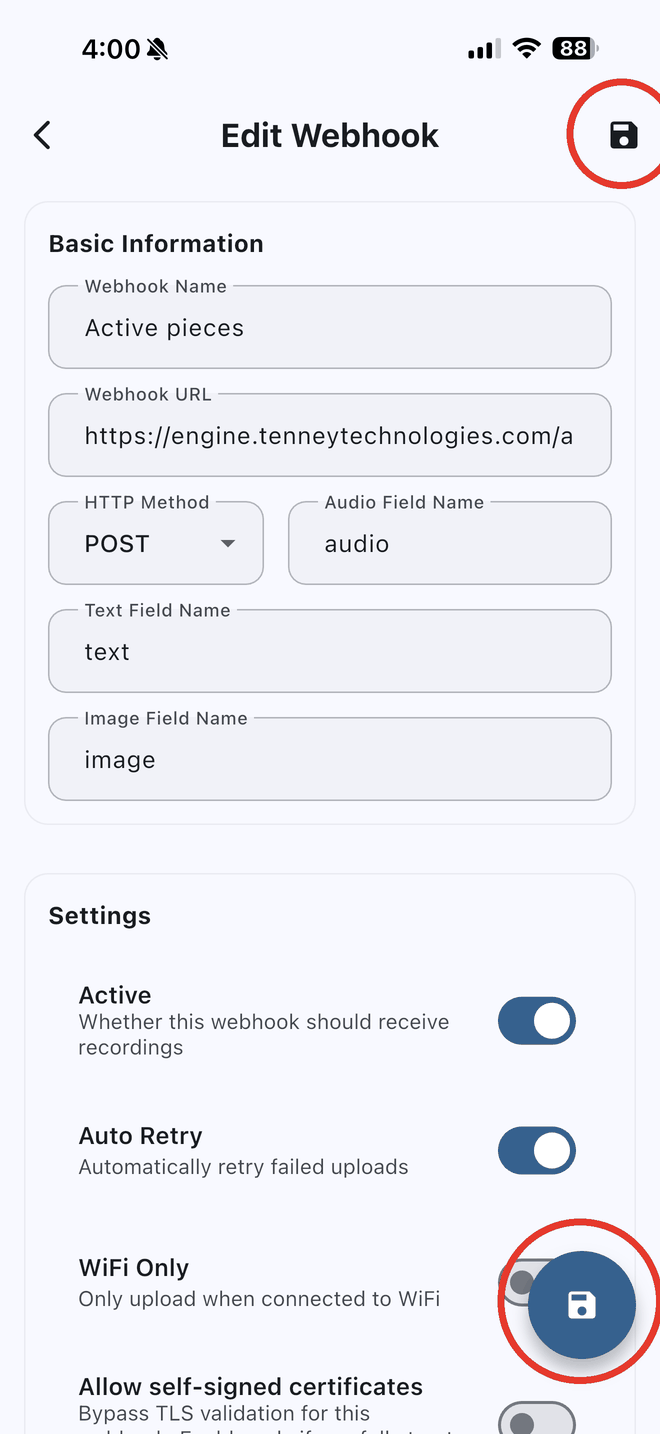
Tap Save, and that's the whole setup. The Save button is easy to miss — it's the little disk icon, and the app actually gives you two. Either one works:
Step C: Record a test memo
- Record a quick test (say anything, 10 seconds is fine) and stop. The app will show it as sent. That's the whole workflow from now on: open, record, stop, done.
Set up your review queue
Your drafts will land in Buffer, the tool where you read each post, tweak it if you want, and publish it to LinkedIn. We host it and pay for it. You stay in control, and nothing posts without you.
Step A: Create your free Buffer account
- Go to buffer.com and sign up. The free plan is all you need.
- Go all the way through Buffer's setup wizard, then come back here. When it asks which channels to connect, connect your LinkedIn profile. Buffer walks you through it with pictures.
- If your LinkedIn profile isn't connected when the wizard finishes, click its button on the left side of the Buffer screen to connect it.
Step B: Connect the Content Engine
- Check the box below, then click the button. Buffer will open in a new tab and ask you to allow Content Engine to create drafts in your account.
- Click Allow. That's it — come back here and hit Finish.
That's it. You're in.
Watch your inbox at — the moment your Buffer connection lands, your engine goes live and your welcome email arrives with everything you need. (No welcome email after a few minutes? That means your Buffer isn't connected yet — go back a page and hit Connect.)
Here's what happens next:
- You start recording. Pick a story from your story bank and tell it into your recorder app like you were telling it to a friend at lunch. Two or three minutes is plenty. Rambling is fine (rambling is actually good).
- Drafts show up in Buffer. Every memo you record becomes a draft in your Buffer queue, usually within about 15 minutes. Read it, tweak it if you want, schedule it.
- Your voice keeps getting sharper. Your voice profile is built from everything you just gave us, and we keep tuning it as your first drafts come through.
Short, with pictures: reviewing your drafts, setting posting times, and one-click links straight to your queue. Worth a bookmark.